> ## Documentation Index
> Fetch the complete documentation index at: https://turnkey-0e7c1f5b-bc-add-sdk-typedoc.mintlify.site/llms.txt
> Use this file to discover all available pages before exploring further.
# Overview
> Email Authentication enables users to authenticate and recover their Turnkey accounts using email-based verification. There are two methods of email authentication:
**One-Time Password**
* Uses a 6-digit one-time password sent via email
* Simple, and familiar user experience
**Credential Bundle**
* Sends an encrypted API key credential directly via email
* Alternative method for specific use cases
* More secure, but requires copying the full credential to the client
Both methods provide users with an expiring API key for authentication or account recovery.
## Core Mechanism
Email Authentication is built with expiring API keys as the foundation. The two delivery mechanisms are:
### OTP-based Method
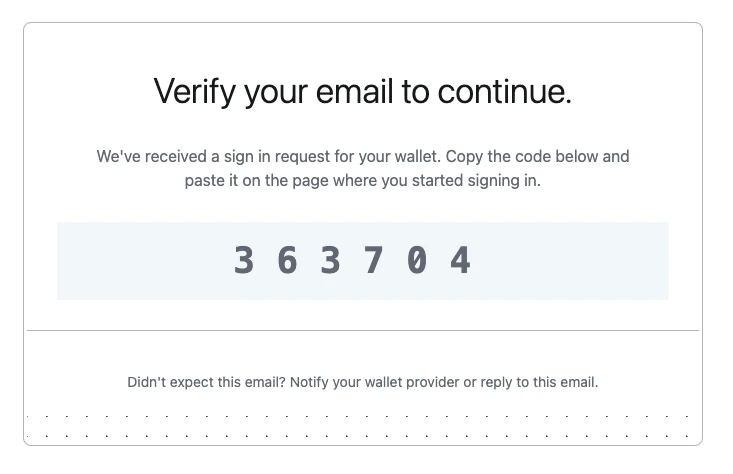
The authentication process happens in two steps:
A 6-digit OTP code is sent to the user's verified email address
Upon verification of the correct code, an API key credential is generated
and encrypted for the client
### Credential Bundle Method
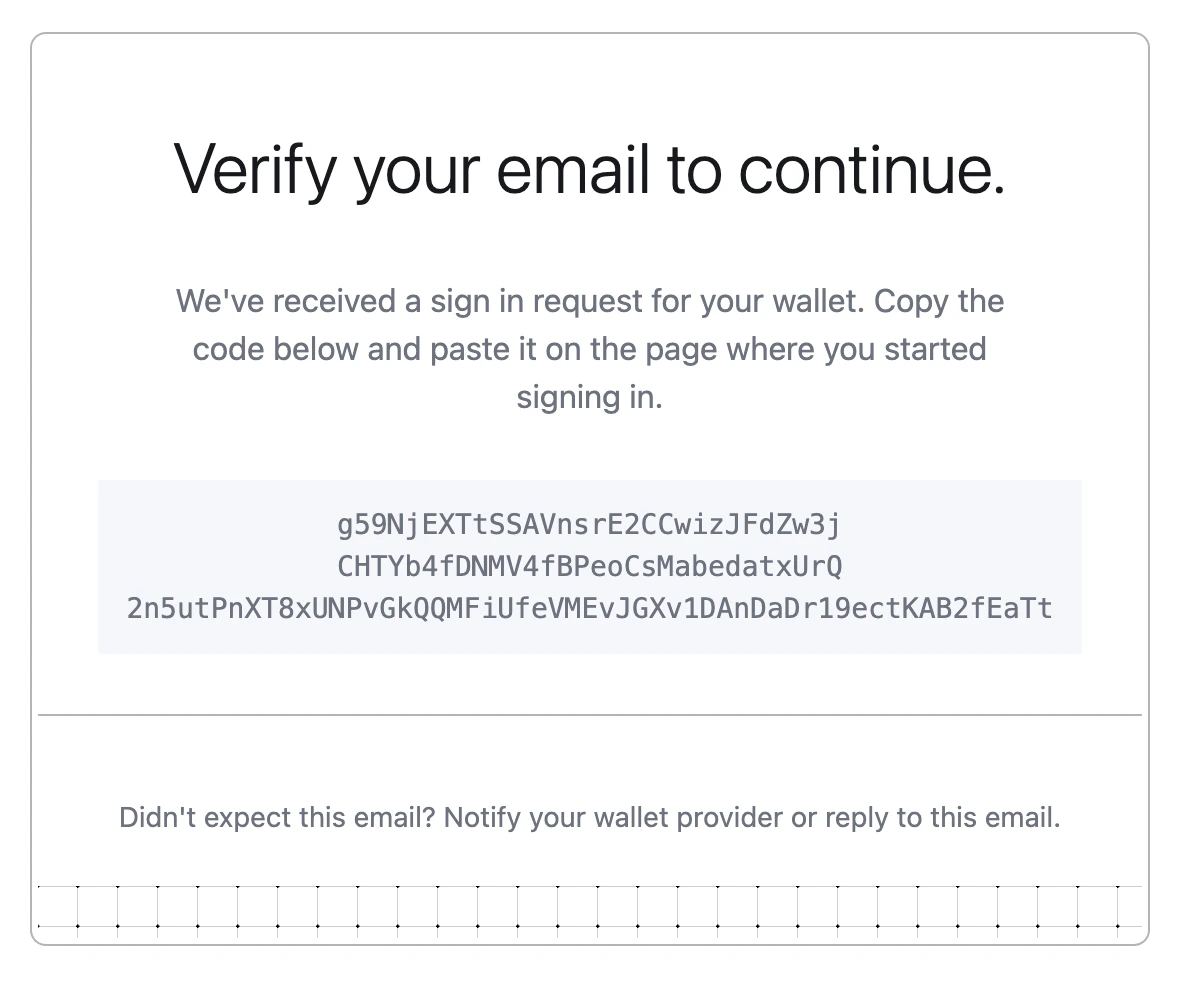
The API key credential is encrypted and delivered directly through email to the user.
In both cases, once the credential is live on the client side (within the context of an iframe), it is readily available to stamp (authenticate) requests. See the [enclave to end-user secure channel](/security/enclave-secure-channels) for more info on how we achieve secure delivery.
## User Experience
### OTP-based Authentication Flow
The flow begins with a new activity of type `ACTIVITY_TYPE_INIT_OTP_AUTH` with these parameters:
* `otpType`: specify `"OTP_TYPE_EMAIL"`
* `contact`: user's email address (must match their registered email)
* `emailCustomization`: optional parameters for customizing emails
* `userIdentifier`: optional parameter for rate limiting SMS OTP requests per user.
We recommend generating this server-side based on the user's IP address or public key.
See the [OTP Rate Limits](#otp-rate-limits) section below for more details.
After receiving the 6-digit code, users complete authentication with `ACTIVITY_TYPE_OTP_AUTH`:
* `otpId`: ID from the init activity
* `otpCode`: the 6-digit code received via email
* `targetPublicKey`: public key for credential encryption
* `apiKeyName`: optional name (defaults to `OTP Auth - `)
* `expirationSeconds`: optional validity window (defaults to 15 minutes)
* `invalidateExisting`: optional boolean to invalidate previous OTP Auth API keys
 ### OTP Rate Limits
In order to safeguard users, Turnkey enforces rate limits for OTP auth activities. If a `userIdentifier` parameter is provided, the following limits are enforced:
* 3 requests per 3 minutes per unique `userIdentifier`
* 3 retries max per code, after which point that code will be locked
* 3 active codes per user, each with a 5 minute TTL
### Credential Bundle Authentication Flow
This alternative method uses `ACTIVITY_TYPE_EMAIL_AUTH` with these parameters:
* `email`: user's email address (must match their registered email)
* `targetPublicKey`: public key for credential encryption
* `apiKeyName`: optional name (defaults to `Email Auth - `)
* `expirationSeconds`: optional validity window (defaults to 15 minutes)
* `emailCustomization`: optional parameters for customizing emails
* `invalidateExisting`: optional boolean to invalidate previous Email Auth API keys
### OTP Rate Limits
In order to safeguard users, Turnkey enforces rate limits for OTP auth activities. If a `userIdentifier` parameter is provided, the following limits are enforced:
* 3 requests per 3 minutes per unique `userIdentifier`
* 3 retries max per code, after which point that code will be locked
* 3 active codes per user, each with a 5 minute TTL
### Credential Bundle Authentication Flow
This alternative method uses `ACTIVITY_TYPE_EMAIL_AUTH` with these parameters:
* `email`: user's email address (must match their registered email)
* `targetPublicKey`: public key for credential encryption
* `apiKeyName`: optional name (defaults to `Email Auth - `)
* `expirationSeconds`: optional validity window (defaults to 15 minutes)
* `emailCustomization`: optional parameters for customizing emails
* `invalidateExisting`: optional boolean to invalidate previous Email Auth API keys
 ### Recovery Flow
For account recovery scenarios, users can initiate a recovery-specific flow using the `ACTIVITY_TYPE_INIT_USER_EMAIL_RECOVERY` activity type, which requires:
* `email`: the email of the user needing recovery (must match their registered email)
* `targetPublicKey`: the public key for recovery credential encryption
The recovery process consists of two phases:
1. **Initiation**: Generates a temporary recovery credential and sends it via email
2. **Finalization**: User decrypts the recovery credential and uses it to sign an `ACTIVITY_TYPE_RECOVER_USER` activity, which can add new authenticators to regain account access
## Authorization
Authorization is managed through our [policy engine](/concepts/policies/overview):
### Authentication
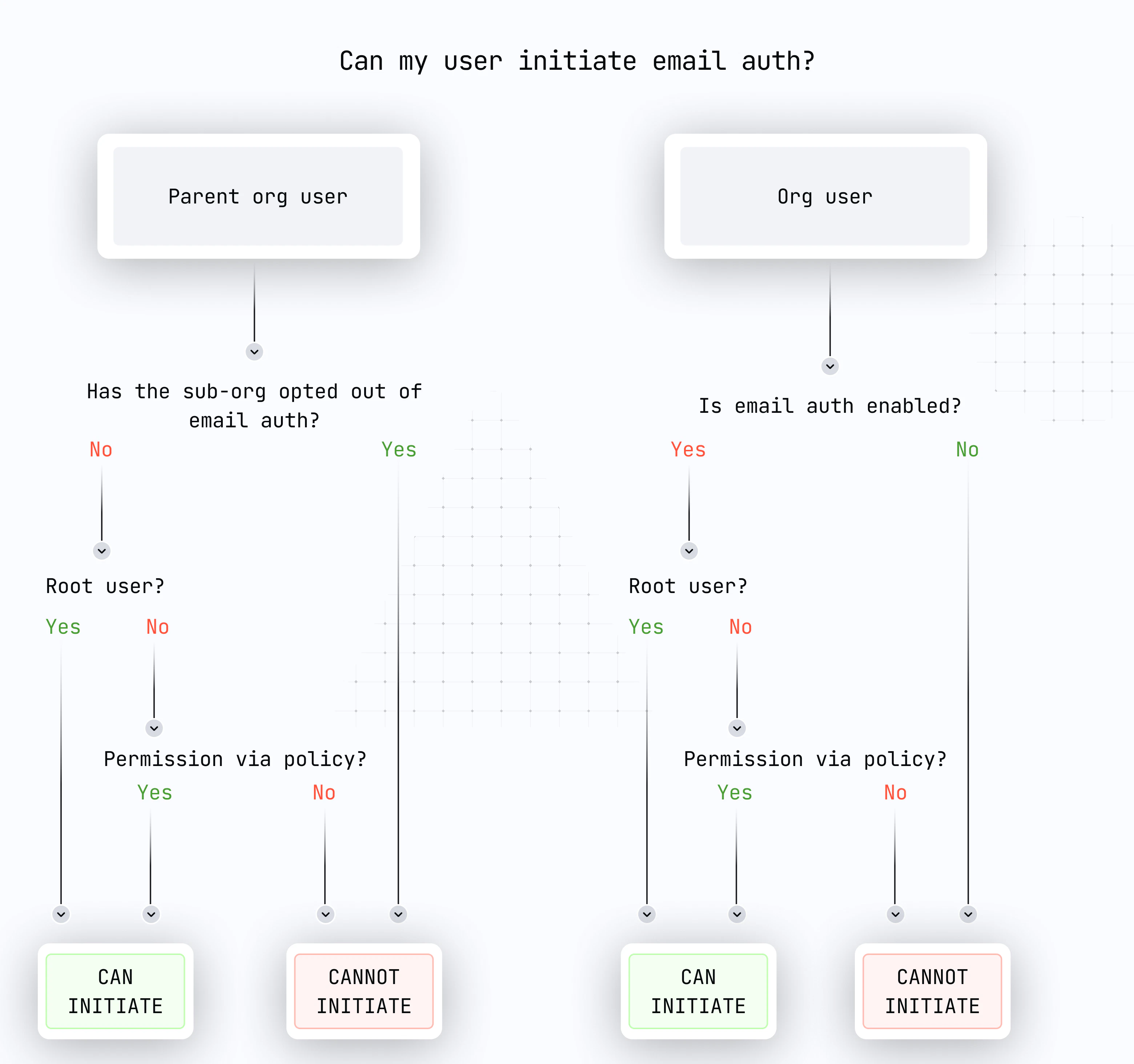
Both OTP-based and credential bundle authentication activities:
* Can be performed by [root users](/concepts/overview#users) and users with proper policy authorization
* Require the respective feature to be enabled in the organization and sub-organization
* Can target any user in the organization or sub-organizations
Specifically:
* For OTP-based auth: `ACTIVITY_TYPE_INIT_OTP_AUTH` and `ACTIVITY_TYPE_OTP_AUTH`
* For credential bundle auth: `ACTIVITY_TYPE_EMAIL_AUTH`
### Recovery
* `ACTIVITY_TYPE_INIT_USER_EMAIL_RECOVERY`:
* Initiates the recovery process
* Requires proper authorization via policies
* Can target any user in the organization or sub-organizations
* `ACTIVITY_TYPE_RECOVER_USER`:
* Must be signed by the recovery credential received via email
* Users can add credentials to their own user when authenticated
* Recovery credentials expire after 15 minutes
* Only the most recent recovery credential remains valid
* Users can add new authenticators to regain account access when authenticated with a recovery credential
### Recovery Flow
For account recovery scenarios, users can initiate a recovery-specific flow using the `ACTIVITY_TYPE_INIT_USER_EMAIL_RECOVERY` activity type, which requires:
* `email`: the email of the user needing recovery (must match their registered email)
* `targetPublicKey`: the public key for recovery credential encryption
The recovery process consists of two phases:
1. **Initiation**: Generates a temporary recovery credential and sends it via email
2. **Finalization**: User decrypts the recovery credential and uses it to sign an `ACTIVITY_TYPE_RECOVER_USER` activity, which can add new authenticators to regain account access
## Authorization
Authorization is managed through our [policy engine](/concepts/policies/overview):
### Authentication
Both OTP-based and credential bundle authentication activities:
* Can be performed by [root users](/concepts/overview#users) and users with proper policy authorization
* Require the respective feature to be enabled in the organization and sub-organization
* Can target any user in the organization or sub-organizations
Specifically:
* For OTP-based auth: `ACTIVITY_TYPE_INIT_OTP_AUTH` and `ACTIVITY_TYPE_OTP_AUTH`
* For credential bundle auth: `ACTIVITY_TYPE_EMAIL_AUTH`
### Recovery
* `ACTIVITY_TYPE_INIT_USER_EMAIL_RECOVERY`:
* Initiates the recovery process
* Requires proper authorization via policies
* Can target any user in the organization or sub-organizations
* `ACTIVITY_TYPE_RECOVER_USER`:
* Must be signed by the recovery credential received via email
* Users can add credentials to their own user when authenticated
* Recovery credentials expire after 15 minutes
* Only the most recent recovery credential remains valid
* Users can add new authenticators to regain account access when authenticated with a recovery credential
 ## Implementation in Sub-organizations
Both authentication methods and recovery work seamlessly with [sub-organizations](/concepts/sub-organizations).
### Example Implementations
* [OTP Auth Example](https://github.com/tkhq/sdk/tree/main/examples/otp-auth)
* [Email Auth Example](https://github.com/tkhq/sdk/tree/main/examples/email-auth)
* [Email Recovery Example](https://github.com/tkhq/sdk/tree/main/examples/email-recovery)
* [Demo Embedded Wallet](https://wallet.tx.xyz) ([code](https://github.com/tkhq/demo-embedded-wallet))
For implementation details:
## Implementation in Organizations
For organizations accessed via dashboard:
1. Ensure the required features are enabled:
* `FEATURE_NAME_OTP_EMAIL_AUTH` for OTP-based authentication
* `FEATURE_NAME_EMAIL_AUTH` for credential bundle authentication
* Recovery features if needed
2. Users initiating the request must have appropriate permissions
## Opting Out
Organizations can disable email-based features if their security model requires it:
Use `ACTIVITY_TYPE_REMOVE_ORGANIZATION_FEATURE` to disable:
* `FEATURE_NAME_OTP_EMAIL_AUTH` for OTP-based authentication
* `FEATURE_NAME_EMAIL_AUTH` for credential bundle authentication
* `FEATURE_NAME_EMAIL_RECOVERY` for recovery
When creating sub-organizations, use:
* `disableOtpEmailAuth` parameter for OTP-based authentication
* `disableEmailAuth` parameter for credential bundle authentication
* `disableEmailRecovery` parameter for recovery
## Implementation Notes[](#implementation-notes "Direct link to Implementation Notes")
* Users are limited to:
* 10 long-lived API keys
* 10 expiring API keys (oldest are discarded when limit is reached)
### For Top-level Organizations
* Both authentication methods are disabled by default
* Must be enabled via `ACTIVITY_TYPE_SET_ORGANIZATION_FEATURE`
### For Sub-organizations
* Both authentication methods are enabled by default
* Can be disabled during creation using `CreateSubOrganizationIntentV7` activity parameters
Example of enabling OTP-based Email Auth:
```bash theme={"system"}
turnkey request --host api.turnkey.com --path /public/v1/submit/set_organization_feature --body '{
"timestampMs": "'"$(date +%s)"'000",
"type": "ACTIVITY_TYPE_SET_ORGANIZATION_FEATURE",
"organizationId": "",
"parameters": {
"name": "FEATURE_NAME_OTP_EMAIL_AUTH"
}
}' --organization
```
Example of enabling credential bundle Email Auth:
```bash theme={"system"}
turnkey request --host api.turnkey.com --path /public/v1/submit/set_organization_feature --body '{
"timestampMs": "'"$(date +%s)"'000",
"type": "ACTIVITY_TYPE_SET_ORGANIZATION_FEATURE",
"organizationId": "",
"parameters": {
"name": "FEATURE_NAME_EMAIL_AUTH"
}
}' --organization
```
## Implementation in Sub-organizations
Both authentication methods and recovery work seamlessly with [sub-organizations](/concepts/sub-organizations).
### Example Implementations
* [OTP Auth Example](https://github.com/tkhq/sdk/tree/main/examples/otp-auth)
* [Email Auth Example](https://github.com/tkhq/sdk/tree/main/examples/email-auth)
* [Email Recovery Example](https://github.com/tkhq/sdk/tree/main/examples/email-recovery)
* [Demo Embedded Wallet](https://wallet.tx.xyz) ([code](https://github.com/tkhq/demo-embedded-wallet))
For implementation details:
## Implementation in Organizations
For organizations accessed via dashboard:
1. Ensure the required features are enabled:
* `FEATURE_NAME_OTP_EMAIL_AUTH` for OTP-based authentication
* `FEATURE_NAME_EMAIL_AUTH` for credential bundle authentication
* Recovery features if needed
2. Users initiating the request must have appropriate permissions
## Opting Out
Organizations can disable email-based features if their security model requires it:
Use `ACTIVITY_TYPE_REMOVE_ORGANIZATION_FEATURE` to disable:
* `FEATURE_NAME_OTP_EMAIL_AUTH` for OTP-based authentication
* `FEATURE_NAME_EMAIL_AUTH` for credential bundle authentication
* `FEATURE_NAME_EMAIL_RECOVERY` for recovery
When creating sub-organizations, use:
* `disableOtpEmailAuth` parameter for OTP-based authentication
* `disableEmailAuth` parameter for credential bundle authentication
* `disableEmailRecovery` parameter for recovery
## Implementation Notes[](#implementation-notes "Direct link to Implementation Notes")
* Users are limited to:
* 10 long-lived API keys
* 10 expiring API keys (oldest are discarded when limit is reached)
### For Top-level Organizations
* Both authentication methods are disabled by default
* Must be enabled via `ACTIVITY_TYPE_SET_ORGANIZATION_FEATURE`
### For Sub-organizations
* Both authentication methods are enabled by default
* Can be disabled during creation using `CreateSubOrganizationIntentV7` activity parameters
Example of enabling OTP-based Email Auth:
```bash theme={"system"}
turnkey request --host api.turnkey.com --path /public/v1/submit/set_organization_feature --body '{
"timestampMs": "'"$(date +%s)"'000",
"type": "ACTIVITY_TYPE_SET_ORGANIZATION_FEATURE",
"organizationId": "",
"parameters": {
"name": "FEATURE_NAME_OTP_EMAIL_AUTH"
}
}' --organization
```
Example of enabling credential bundle Email Auth:
```bash theme={"system"}
turnkey request --host api.turnkey.com --path /public/v1/submit/set_organization_feature --body '{
"timestampMs": "'"$(date +%s)"'000",
"type": "ACTIVITY_TYPE_SET_ORGANIZATION_FEATURE",
"organizationId": "",
"parameters": {
"name": "FEATURE_NAME_EMAIL_AUTH"
}
}' --organization
```